GO的GDB调试

GoLang语言,学了很久,一直觉得它单步调试有较多问题,最近才知道自已对它了解得太少了。
原来GO语言对GDB的版本是至少为gdb7以上,才能比较好的打印任意变量,如果低于这个版本,则才会出一些问题。
网上说GDB版本为7.1,本人使用GDB7.8版本测试,确实很不错。以下是记录单步调试使用的几个打印变量。
info frame,打印当前栈参数。
info locals打印局部变量
info args打印参数。
bt显示当前堆栈
x/3xw &r查看内存

删除调试符号:go build -ldflags “-s -w” filename.go

-s: 去掉符号信息。
-w: 去掉DWARF调试信息。
关闭内联优化:go build -gcflags “-N -l” filename.go

—————–
在centos6.6里利用原生的GDB调试时,发现如下特点。
1.直接使用list命令,会进入到一个如下状态。
(gdb) l
/usr/local/go/src/runtime/rt0_linux_amd64.s: No such file or directory.
in /usr/local/go/src/runtime/rt0_linux_amd64.s

2.可以使用l main.main命令定位到主函数。
(gdb) l main.main
warning: Source file is more recent than executable.
4
5 type point struct {
6 x, y int
7 }
8
9 func main() {
10 i:=32
11 p := point{1, 2}
12 f := 3.3434
13 txt := "sdfsdfdsfsfds"

搜索引擎

Solr:http://lucene.apache.org/solr/,基于lucene的企业级搜索引擎
coreseek:http://www.coreseek.cn/基于sphinx的搜索引擎,适合论坛中小站类的搜索引擎

ibus输入法故障

sudo yum remove ibus --会将所有的输入法删除
安装ibus,ibus-table
sudo yum install ibus ibus-table –这样只会安装ibus的输入框架
sudo yum install ibus-table-wubi
yum install “@Chinese Support”
———————–
解决 CentOS 6.x 升级 Python2.7 后 Ibus 输入法无法使用问题
/usr/libexec/ibus-ui-gtk
/usr/ bin/ibus-setup
/usr/libexec/ibus-engine-table

将以上三个文件中的 “exec python” 修改为 “exec python26”

Qt与Object-C混合编程

1.添加proxy_ios.h文件,内容如下:
#ifndef PROXY_IOS_H
#define PROXY_IOS_H

QString systemProxy();

#endif // PROXY_IOS_H
2.添加proxy_ios.mm文件,内容如下:

#import
#import
#include

QString systemProxy(){
NSDictionary *proxySettings = NSMakeCollectable([(NSDictionary *)CFNetworkCopySystemProxySettings() autorelease]);
NSArray *proxies = NSMakeCollectable([(NSArray *)CFNetworkCopyProxiesForURL((CFURLRef)[NSURL URLWithString:@"http://www.baidu.com"], (CFDictionaryRef)proxySettings) autorelease]);
NSDictionary *settings = [proxies objectAtIndex:0];

QString host = QString::fromNSString([NSString stringWithFormat:@"%@", [settings objectForKey:(NSString *)kCFProxyHostNameKey]]);
QString port = QString::fromNSString([NSString stringWithFormat:@"%@", [settings objectForKey:(NSString *)kCFProxyPortNumberKey]]);
// QString type = QString::fromNSString([NSString stringWithFormat:@"%@", [settings objectForKey:(NSString *)kCFProxyTypeKey]]);
return host+":"+port;
}

3.在.pro工程文件中添加:
ios {
QMAKE_LFLAGS += -framework OpenGLES
QMAKE_LFLAGS += -framework GLKit
QMAKE_LFLAGS += -framework QuartzCore
QMAKE_LFLAGS += -framework CoreVideo
QMAKE_LFLAGS += -framework CoreAudio
QMAKE_LFLAGS += -framework CoreImage
QMAKE_LFLAGS += -framework CoreMedia
QMAKE_LFLAGS += -framework AVFoundation
QMAKE_LFLAGS += -framework AudioToolbox
QMAKE_LFLAGS += -framework CoreGraphics
QMAKE_LFLAGS += -framework UIKit
QMAKE_LFLAGS += -framework CFNetwork
}
4.使用Qt添加proxy_ios.h和proxy_ios.mm文件。
5.在main.cpp文件中调用如下:
#include "proxy_ios.h"
void setDefaultProxy(){
QString hostport = systemProxy();
qDebug() <<"had find proxy address:" << hostport; if(!hostport.isEmpty()){ QStringList ip_port = hostport.split(':'); if(ip_port.length() != 2){ return; } QString host = ip_port.at(0); QString port = ip_port.at(1); if(host.contains("null") || port.contains("null")){ return; } bool ok = false; int iport = port.toInt(&ok); if(!ok || iport <= 0){ return; } QNetworkProxy proxy; proxy.setType(QNetworkProxy::HttpProxy);//设置类型 proxy.setHostName(host);//设置代理服务器地址 proxy.setPort(iport);//设置端口 QNetworkProxy::setApplicationProxy(proxy); qDebug() <<"+++had set proxy address:" << hostport; } }

6.编译即可。

yii的URL美化

ULR美化需要nginx的配合完成的。
本人是使用阿里云的lnmp构建。故以其为例,记录如下:
1.nginx的配置如下:
首先是rewrite规则,在/alidata/server/nginx/conf/rewrite目录下增加aixuefo.conf文件,其内容如下:

location / {
if (-f $request_filename/index.html){
rewrite (.*) $1/index.html break;
}
if (-f $request_filename/index.php){
rewrite (.*) $1/index.php;
}
if (!-f $request_filename){
rewrite (.*) /index.php;
}
}

接着是主站的配置,在/alidata/server/nginx/conf/vhosts目录下新增aixuefo.conf文件,其内容如下:
server {
listen 80;
server_name www.aixuefo.com aixuefo.com;
index index.html index.htm index.php;
root /alidata/www/aixuefo;
location ~ .*\.(php|php5)?$
{
fastcgi_pass unix:/alidata/server/php/var/run/php5-fpm.sock;
#fastcgi_pass 127.0.0.1:9132;
fastcgi_index index.php;
include fastcgi.conf;
}
location ~ .*\.(gif|jpg|jpeg|png|bmp|swf)$
{
expires 30d;
}
location ~ .*\.(js|css)?$
{
expires 1h;
}
#伪静态规则
include /alidata/server/nginx/conf/rewrite/aixuefo.conf;
access_log /alidata/log/nginx/access/aixuefo.log;
}

然后是yii的组件配置:如下
‘urlManager’=>[
‘enablePrettyUrl’=>true,
‘rules’=>[
// ‘dashboard’ => ‘site/index’,
//
// ‘POST s’ => ‘/create’,
// ‘s’ => ‘/index’,
//
// ‘PUT /‘ => ‘/update’,
// ‘DELETE /‘ => ‘/delete’,
// ‘/‘ => ‘/view’,
// ‘//‘ => ‘/‘,
‘posts’ => ‘post/default/list’, 只测试这个小小例子
],

],

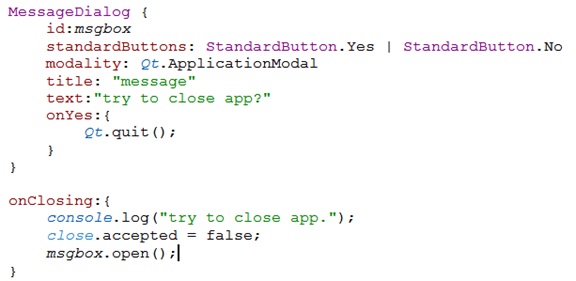
QML退出进程例子

abc
MessageDialog {
id:msgbox
standardButtons: StandardButton.Yes | StandardButton.No
modality: Qt.ApplicationModal
title: "message"
text:"try to close app?"
onYes:{
Qt.quit();
}
}

onClosing:{
console.log("try to close app.");
close.accepted = false;
msgbox.open();
}

Qt的编译宏

打开pro项目文件,其宏格式如下:


android标识代表,是应用android平台,因为qt是支持android和IOS的,android和IOS的配置差异就可以通过这来标识。

贴一个Android和IOS的宏:

QtAndroid调用java的例子

1.QtCreator创建QtExtra工程。

2.打开:项目->创建模板->确定。则可产生一个AndroidManifest.xml创建文件。


3.检查一下AndroidManifest.xml的所在目录。


4.参考Qt5.4.2\Examples\Qt-5.4\androidextras\notification的例子,将其子目录android-sources\src目录拷贝到你的工程里,如下:


5.修改src目录下NotificationClient.java文件,如下:

package
org.qtproject.example.notification;

import
android.content.Context;


public
class
NotificationClient
extends
org.qtproject.qt5.android.bindings.QtActivity

{


public
static
String
systemProxy()


{


String
hostdef=“”,
host=“”,
port=“”;


int
portdef=0;


try{


hostdef
=
android.net.Proxy.getDefaultHost();


portdef
=
android.net.Proxy.getDefaultPort();


host
=
System.getProperty(“http.proxyHost”);


port
=
System.getProperty(“http.proxyPort”);


}catch(Exception
e){


}


return
hostdef+“:”+portdef+“|”+host+“:”+port;


}

}


6.pro文件中添加androidextras库:

QT
+=
androidextras

7.main.cpp函数里,这样调用:

#include
<QtAndroidExtras/QAndroidJniObject>

#include
<QDebug>

QAndroidJniObject
stringArray
=
QAndroidJniObject::callStaticObjectMethod(“org/qtproject/example/notification/NotificationClient”,
“systemProxy”,“()Ljava/lang/String;”);

QString
my
=
stringArray.toString();

qDebug()
<<
“my:”
<<
my;

8编译测试: