mytest='"summary":{"day":{"burstTotal":0,"dropTotal":135764,"flowTotal":69449},"input":{"spanCount":900,"spanInterval":10},"spanNow":{"burstTotal":0,"dropTotal":1,"flowTotal":4,"now":1548691410},"spans"'
echo $mytest| sed 's/\(.*\)"day":{"burstTotal":\([[:alnum:]]*\),"dropTotal":\([[:alnum:]]*\),"flowTotal":\([[:alnum:]]*\).*/\4/' && echo ":flow121"
分类目录归档:未分类
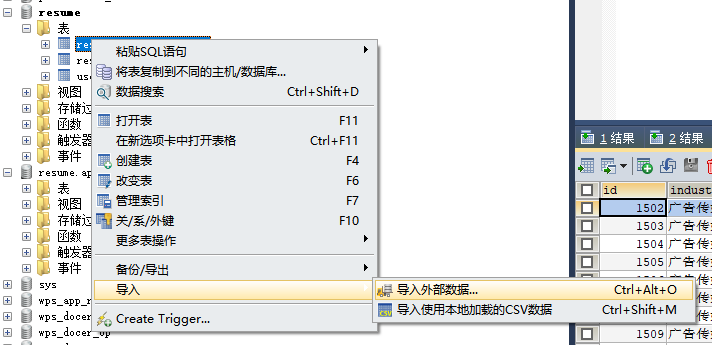
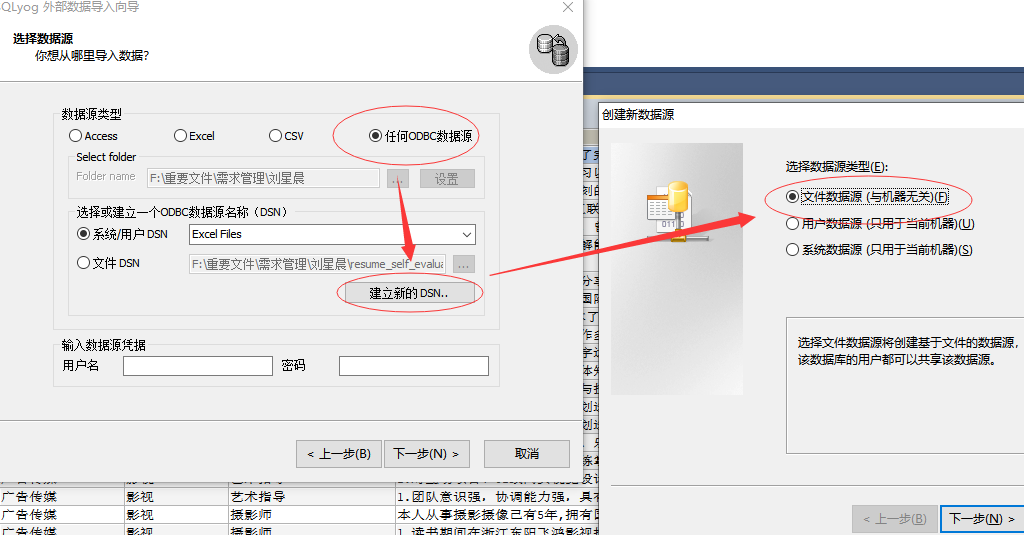
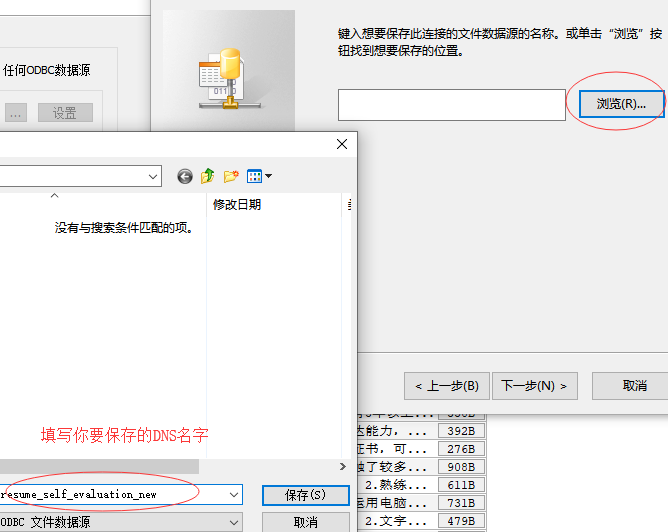
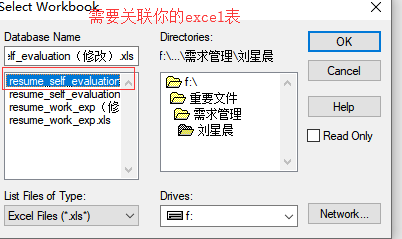
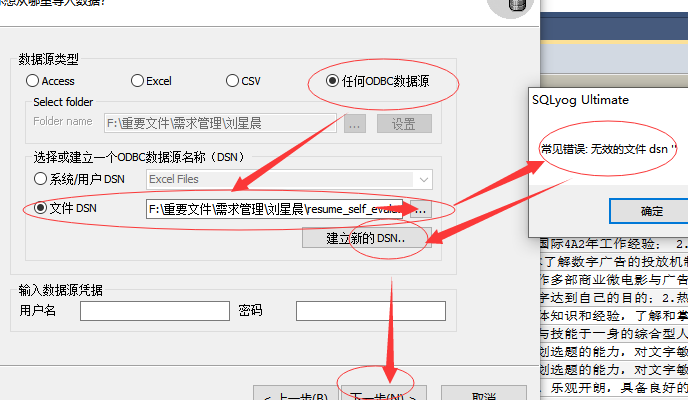
excel数据导入数据库
1.安装sqlyog工具。
2.步骤一

3.步骤二

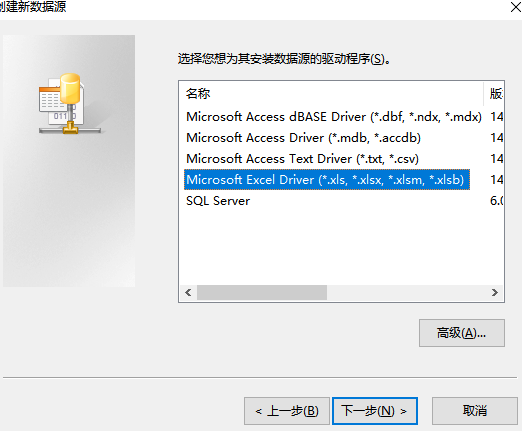
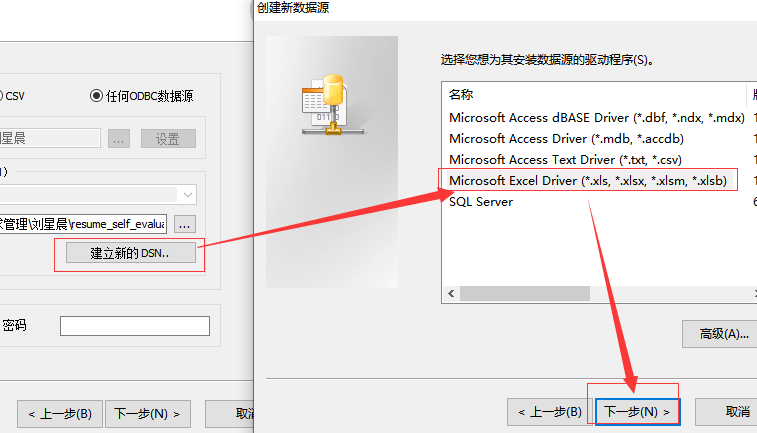
4.步骤三


创建了DNS时,需要关联表


5.步骤四

6.步骤五
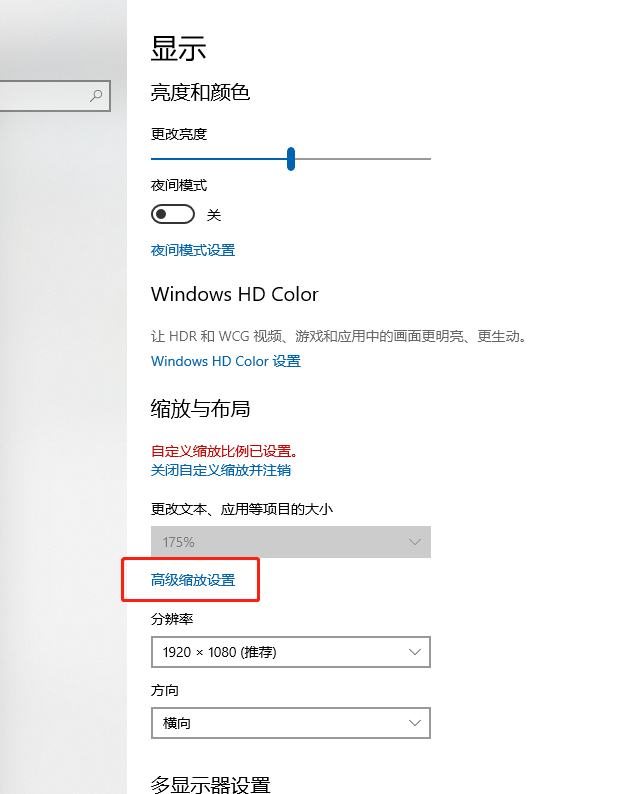
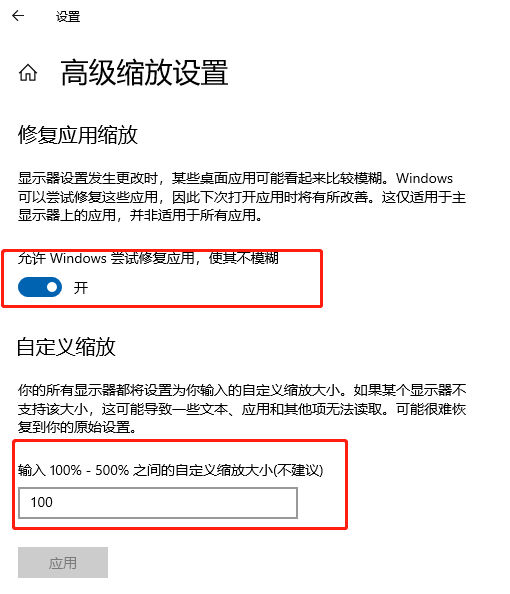
解决WIN10显示文字模糊
主要原因是系统允许应的缩放比例生效,按如下修改可解决。
1.桌面右键->显示设置->高级缩放设置如下图:

2.在高级缩放设置中,开启“允许window尝试修复应用,使其不糊模”,及在自定义缩放比例上,填上100%的缩放显示。

logstash的简易测试
stdout{codec=>rubydebug{}}
穿墙服务器购买
同事介绍这个服务器提供商,是按小时计费,不限带宽,遇到IP被墙,即时可换IP的服务。
https://www.vultr.com

etw的信息提取
https://docs.microsoft.com/en-us/windows-hardware/test/wpt/xperf-actions
xperf -tle –i myetw.etl -o providers.csv -a dumper -provider {CA80A0D7-6CA2-4F62-B22D-D0F88D79AE4B}

https://docs.microsoft.com/en-us/windows-hardware/test/weg/instrumenting-your-code-with-etw
Copy your component to the location that was specified in your manifest by the resourceFileName attribute:
xcopy /y MyProviderBinary.exe %temp%
Register the providers:
wevtutil um etwmanifest.man
wetvutil im etwmanifest.man
Verify that the provider is visible:
logman query providers
Your provider name/GUID will appear in the list.
1.Start tracing:
xperf -start MySession -on MyEventProvider -f MySession.etl
# In that command line, -start gives the event collection session a name, and -on tells ETW that you want to collect events from your provider in this session. (There can be multiple -on arguments.)
2.Execute your workload.
3.Stop tracing:
xperf -stop MySession
@echo off
echo "clean session.."
xperf -stop app_session -d app_tmp.etl
xperf -stop -d base_tmp.etl
if exist app_tmp.etl (del app_tmp.etl)
if exist base_tmp.etl (del base_tmp.etl)
echo "open session.."
set now=%date:~0,4%%date:~5,2%%date:~8,2%_%time:~0,2%%time:~3,2%%time:~6,2%
set now=%now: =0%
echo %now%
xperf -start -on Base
xperf -start app_session -on CA80A0D7-6CA2-4F62-B22D-D0F88D79AE4B
echo "请启动prometheus应用。"
timeout 100
xperf -stop app_session -d app_tmp.etl
xperf -stop -d base_tmp.etl
xperf -merge base_tmp.etl app_tmp.etl prometheus_%now%.etl
xperf -tle -i abc_%now%.etl -o hardfaults_%now%.csv -a hardfault -file -bytes
xperf -tle -i abc_%now%.etl -o time_%now%.csv -a dumper -provider {CA80A0D7-6CA2-4F62-B22D-D0F88D79AE4B}
xperf -tle -i abc_%now%.etl -o pagefaults_%now%.csv -a dumper -provider {3D6FA8D3-FE05-11D0-9DDA-00C04FD7BA7C}
rem start wpa.exe abc_%now%.etl
docker 网络host模式
docker run -d --net="host" --name webrtc-waypal-build-heguowen -v /root/webrtc_waypal:/webrtc_waypal -it webrtc-waypal-heguowen:v1 /bin/bash
常用的Linux维护命令
1.ps -ALF
2.

线程安全队列
LinkedBlockingQueue
VMWare端口映射
在进行kms的例子测试时,发现快速试验kurento的最佳方式就是【kurento-tutorial-java】+【kurento/kurento-media-server】,然而笔记本摄像头在linux中不被支持,故通过VMware把linux中的kms端口映射到主机中。