作者归档:xinlu

MySQL双写主从配置

以前一般是两个子集群,在写数据时,两个子集群都写。偶然在网上看到双机互为主从的实现,感到有点意思,于是体验一下,感觉还是不错的,特别是数据量较少时,不失为一种防止单点故障的方案。
第一步授权
主:192.168.237.134
create database abc;
create table cc(id int, name varchar(20),age int);
grant replication slave on *.* to ‘root’@’192.168.237.133’identified by ‘123456’;
flush privileges;

主:192.168.237.133
create database abc;
create table cc(id int, name varchar(20),age int);
grant replication slave on *.* to ‘root’@’192.168.237.134’identified by ‘123456’;
flush privileges;

第二步 my.conf文件配置[mysqld]段:
主:192.168.237.134
server-id= 1
binlog-do-db=abc #多个数据库,可重复添加,如果没有设置,则所有数据库。
binlog-do-db=abc
binlog-ignore-db = mysql
master-host=192.168.237.133
master-user=root
master-password=123456
master-port=3306
master-connect-retry=60
log-bin

主:192.168.237.133
server-id= 2
binlog-ignore-db = mysql
master-host=192.168.237.134
master-user=root
master-password=123456
master-port=3306
master-connect-retry=60
replicate-do-db=abc
binlog-do-db=abc
log-bin
Ubuntu更新源

1.阿里云国内源,一健换源

sudo curl -L https://github.com/AndyYoungDev/ubuntu-aliyun-sources/releases/download/shell/change.sh | bash

以前曾因为ubuntu9.04以前的更新源问题,不得不修改项目架构的很多代码,以确保能顺利在10.4上使用,这过程痛苦极了,每次改动都害怕会影响服务器的稳定性。现在可好了,偶然发现ubuntu的一个历史版本更新源,从2006年到2014年的更新源都齐全。这可算是一个好事情了。

http://old-releases.ubuntu.com/ubuntu/dists/

本人从官方源里修改域名后的9.04源地址如下:

deb http://old-releases.ubuntu.com/ubuntu/ jaunty main restricted universe multiverse
deb http://old-releases.ubuntu.com/ubuntu/ jaunty-security main restricted universe multiverse
deb http://old-releases.ubuntu.com/ubuntu/ jaunty-updates main restricted universe multiverse
deb http://old-releases.ubuntu.com/ubuntu/ jaunty-proposed main restricted universe multiverse
deb http://old-releases.ubuntu.com/ubuntu/ jaunty-backports main restricted universe multiverse
deb-src http://old-releases.ubuntu.com/ubuntu/ jaunty main restricted universe multiverse
deb-src http://old-releases.ubuntu.com/ubuntu/ jaunty-security main restricted universe multiverse
deb-src http://old-releases.ubuntu.com/ubuntu/ jaunty-updates main restricted universe multiverse
deb-src http://old-releases.ubuntu.com/ubuntu/ jaunty-proposed main restricted universe multiverse
deb-src http://old-releases.ubuntu.com/ubuntu/ jaunty-backports main restricted universe multiverse

实用工具汇聚

Cacti 是一套基于PHP,MySQL,SNMP及RRDTool开发的网络流量监测图形分析工具。

mysqlreport是mysql性能监测时最常用的工具,对了解mysql运行状态和配置调整都有很大的帮助。

mysqlsla是hackmysql.com推出的一款MySQL的日志分析工具,功能非常强大. 数据报表,非常有利于分析慢查询的原因, 包括执行频率, 数据量, 查询消耗等。

使用fastcgi_finish_request去操作耗时的事情

在访问时,要求在返回相应的数据给客户端后,后续仍需要去处理一些其它事情,例如写日志或跨站访问等,可以使用fastcgi_finish_request来立即响应数据返回并关闭网络,然后继续处理后续的工作。

<?php
echo ‘gomytest:’.date(‘Y-m-d H:i:s’);
file_put_contents(‘log.txt’, date(‘Y-m-d H:i:s’) . ” test1\n”, FILE_APPEND);
if (function_exists(“fastcgi_finish_request”)) {
      function fastcgi_finish_request()  {
      }
}
sleep(10);
file_put_contents(‘log.txt’, date(‘Y-m-d H:i:s’) . ” test2\n”, FILE_APPEND);
sleep(10);
file_put_contents(‘log.txt’, date(‘Y-m-d H:i:s’) . ” test3\n”, FILE_APPEND);
?>  

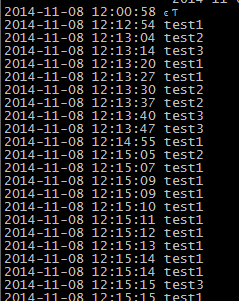
测试的结果是能立即返回,并正确处理后续操作。

image

强者回归:声音依旧动听

今天在网上偶然看到陈慧娴的30周年演唱会,果断下载了。安静地欣赏她的忘我,感触很深,退出乐坛多年了,再次回归,歌声仍旧保持得那么完美,是名符其实的天籁之音。

WordPress的学习资源

以前一直想深入了解WordPress的架构和能自由的修改其页面。但只是缺少资料,现偶有发现这样一个专注介绍WordPress的网站。其相关二次开发的资源都较为丰富,令人不得不添加。

http://www.wpdaxue.com/

其它相关的网站有如下:

http://www.nifree.com/category/website/dowordpresstheme

http://320press.com/wpbs/

http://upplex.de/bootstrap-3-wordpress-theme-framework/

512内存MySQL因out of memory启动失败

重启阿里云服务器后,发现MySQL启动失败。原因如下:

Starting MySQL…The server quit without updating PID file /alidata/server/mysql/data/AY140620200054865f40Z.pid).[失败]

查找syslog日志,发现以下错误。

“Out of memory: Kill process 9682 (mysqld) score 9 or sacrifice child”

经查资料分析,是内核里的 Out of Memory (OOM) killer主动强制杀死mysql进程,以保护系统因不足内存而崩溃。

经多方资源查找分析,原来是mySQL版本升级为5.6版本后,其默认缓存配置被修改为较大值,故会造成这情况。于是把my.cnf文件增加如下:

performance_schema_max_table_instances 12500  =>修改1250
table_definition_cache 1400 =>修改为140
table_open_cache 2000 =>修改200

贴图如下,重启后问题解决。

image